
Using connection mode 16:
Using this LCD IO methof the LCD is controlled via the Microchip PIC16LF72 SPI expander.
To use mode 16 you must define the SPI ports as shown below.
Relevant Constants:
These constants are used to control settings for the LCD routines included with GCBASIC. To set them, place a line in the
main program file that uses #define to assign a value to the particular constant.
When using this mode only three constants are mandated - all others can be ignored.
| Constant Name | Controls | Value |
|---|---|---|
|
|
I/O mode |
|
|
|
Microcontroller SPI data out port |
Required |
|
|
Microcontroller SPI clock out port |
Required |
Connectivity
The connectivity is shown below. The microcontroller connections are as shown below. This is an example using the Microchip PICDEM 4 2003 board.
    //Constants - LCD connectivity type;
            #DEFINE LCD_IO 16

            //PIN MAPPINGS FOR PIC16LF72 LCD IO SPI EXPANDER

                // CONSTANT IS MANDATED - DATA LINE
                #DEFINE LCD_SPI_DO          PORTB.2

                // CONSTANT IS MANDATED - CLOCK LINE
                #DEFINE LCD_SPI_SCK         PORTB.5

    //! Main program

    Print "GCBASIC Rocks"
    End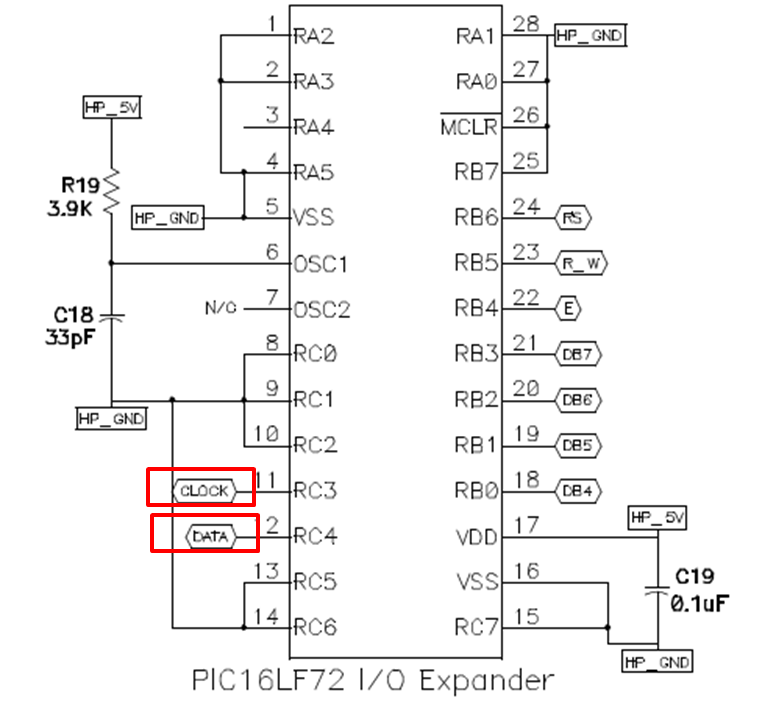
For code examples see LCD Solutions.
See the separate sections of the Help file for the specifics of each Connection Mode.
See Also:
- LCD_IO 0 — single subroutine, software-driven mode
- LCD_IO 1 — 1-wire, via a 74HC595 shift register
- LCD_IO 2 — 2-wire shift register, deprecated
- LCD_IO 2_74xx164 — 2-wire via 74HC164/74LS164, the preferred 2-wire method
- LCD_IO 2_74xx174 — 2-wire via 74LS174, deprecated
- LCD_IO 3 — 3-wire shift register with an added Enable line
- LCD_IO 4 — 4-bit parallel connection
- LCD_IO 8 — 8-bit parallel connection
- LCD_IO 10 — I2C via a PCF8574/PCF8574A I/O expander
- LCD_IO 12 — I2C via a Ywmjkdz-layout adapter
- LCD_IO 14 — SPI expander
- LCD_IO 107 — K107 serial adapter
