
This section covers GLCD fonts and characters.
GLCD Support for Fonts
GCBASIC includes a default fixed bitmap font (5 or 6 pixels wide, 7 or 8 pixels high, depending on the driver) that is always
available and needs no setup. Two optional font systems can be selected instead, by adding a #define before #include <GLCD.h>:
#define GLCD_EXTENDEDFONTSET1— swaps in an extended character table covering ASCII 31-254 instead of the default limited range. This costs additional program memory (around 1.3 KB) in exchange for full extended-ASCII coverage.#define GLCD_OLED_FONT— switches to a font engine tuned for OLED-family controllers (SSD1306, SH1106, and similar), with two internal sizes selected viaGLCDfntDefaultsize.
Only one of these should be selected at a time; if neither is defined, the compact default font is used.
GLCD Support for Characters
Characters are drawn using GLCDDrawChar (a single character) or GLCDDrawString/GLCDPrint (a full string), which look up each character’s bitmap in the currently selected font table and write it to the display buffer
at the given position.
There is no GLCD equivalent of LCDCreateChar (the character-LCD command for defining custom characters) — the built-in GLCD fonts are fixed, compiled-in bitmap tables.
Genuinely custom fonts or characters require the separate glcd_ImagesandFonts_addin3.h add-in, which loads font or image objects from external EEPROM, identified by an object ID and selected by setting GLCDfntDefault (the built-in font is object ID fntGCB, value 0).
For larger digit-only text, such as clock or counter displays, GLCDPrintLargeFont uses a separate dedicated large font (13 pixels high, digits and a limited symbol set only) rather than scaling the normal
character font.
GLCD Character Table
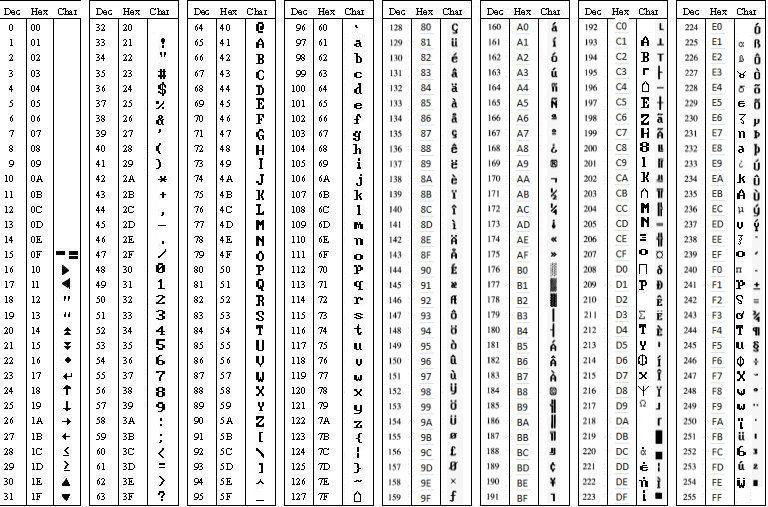
GLCD Controlling Constants
The GCBASIC constants for control of fonts and characters are shown in the table below. Exact values are set by the specific display driver you include and can vary between drivers.
| Constants | Controls | Options |
|---|---|---|
|
|
Width, in pixels, of one character in the current font. |
Typically |
|
|
Height, in pixels, of one character in the current font. |
Typically |
|
|
A scale multiplier applied to both the width and height when drawing a character. |
|
|
|
Selects which font/image object |
|
See Also:
- GLCD Overview — category overview
- GLCDDrawChar — drawing a single character using the current font
- GLCDDrawString — drawing a full string using the current font
- GLCDPrint
- GLCDPrintLargeFont — the separate large digit-only font for clocks/counters
- GLCDPrintWithSize — drawing text at a specific
GLCDfntDefaultsizescale
